How to Get Started Using GANTT Charts
(Part 2 of a 2-Part Series)
By Mark E. Engelberg, TimeLinx
GANTT charts—often displayed as bar charts along a vertical axis of tasks within a project timeline—are powerful tools for managing projects or jobs of all types across most industries. In my previous post, I discussed Baseline and Critical Path functions in a GANTT chart. These features are especially useful in complex projects that require precise resource management or detailed start-finish relationships between tasks. If you are just getting started with GANTT charts, here are 10 recommendations to help you begin. Note that I use “project” and “job” interchangeably, as different industries use different terms. Creating GANTT charts, or even GANTT chart templates, is now easier than ever with project management software or specialized GANTT chart tools.
Define Your Goals and Objectives
Before creating your GANTT chart (sometimes called a project GANTT), define your project or job’s goals and objectives. This step helps you outline the project plan and identify the tasks that need to be performed. Ensure your goals and objectives are clear and measurable so you can track progress throughout the project. While goals and objectives are not usually included in the GANTT chart template itself, they should be documented elsewhere. Start dates and end dates are necessary for a GANTT chart to function, as these determine when each task begins and provide a real-time overview of your schedule.
Identify All Tasks
Once you have defined the goals and objectives, identify all the tasks required to achieve them. List all tasks and subtasks involved in the job—this forms the basis of your tasks GANTT. Be as detailed as possible to avoid missing important steps, especially if your project schedule is tight. In TimeLinx, tasks are created under the Tasks tab or added directly to the GANTT chart. This allows you to track completed tasks and better manage task dependencies.
Create Your GANTT Chart
Create your GANTT chart using software like Microsoft Project, Excel or any other preferred tool. Some teams use Excel GANTT chart templates, while others rely on dedicated project management software. In TimeLinx, your chart is created as part of the job record. Add the tasks identified in the previous step. For larger or more complex projects, consider using chart template features that streamline this process.
Assign Resources to Each Task
Assign resources to each task, including people, equipment, vehicles, materials and meeting rooms. If your scheduling calendar is integrated with the GANTT system (as in TimeLinx), you can immediately see who is available or if equipment is free on specific start dates. If not, refer back and forth to assign resources. This is a key aspect of resource management, as balancing your team’s availability helps maintain a steady flow of tasks on the project timeline.
Estimate Task Durations
Assigning resources in the GANTT from the calendar should show the availability of those resources and any scheduling conflicts. This applies to people, equipment and vehicles, as their availability determines when project tasks can be performed and how the project progresses. Estimating realistic task durations helps stabilize your project schedule, track progress and integrate the job into your overall project plan. If you have not read the prior article on Baseline and Critical Path functions, now is a good time to get acquainted with those for sequencing tasks in GANTT chart setups.
Determine Task Dependencies
Some tasks depend on others and cannot start until a previous task is partially or fully completed. Identify these dependencies and use GANTT chart features to connect them. This helps you understand the importance of task sequence, especially in complex projects with many subtasks. Properly linking tasks improves your project plan and helps you visualize overlapping efforts.
Typically, tasks are connected like this:
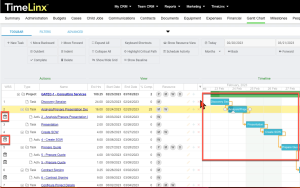
In this image, the small Calendar icons on certain lines represent calendar activities in TimeLinx.
Set Milestones
Milestones are significant events that mark progress in your project. They are often linked to the completion of one or more tasks. A milestone might also indicate when a payment is due for related tasks. Milestones are usually shown as diamond shapes on the chart template. Set milestones for your project and mark them on your GANTT chart. This keeps your team motivated and focused on completing the project milestone by milestone, providing a clear view of your timeline.
Monitor Progress
As you work on your project, monitor your progress and update your GANTT chart accordingly. This helps you stay on schedule and highlights areas that need special attention if you notice slippage or potential conflicts. Many GANTT chart software solutions provide real-time updates, allowing you to track project progress and adjust resources as needed.
Communicate With Your Team
Effective communication is essential for project success. Communicate regularly with your team about progress, completed tasks and any changes to the GANTT chart. This ensures everyone is aligned and working toward the same goals. Some systems send notifications via text or email to interested parties when changes are made, saving time and enabling effective coordination across the project GANTT chart.
Adjust Your GANTT Chart as Needed
Be prepared to adjust your GANTT chart as needed. Projects rarely go exactly as planned, so you may need to update your chart when you encounter unexpected issues or delays. By monitoring progress and staying flexible, you can ensure your start-finish timelines remain realistic and that you are using your project management software effectively. This adaptability helps you implement GANTT chart strategies that guide each job to successful completion.
GANTT charts are valuable tools for managing jobs—whether small or large, simple or complex. By following these ten recommendations for creating effective GANTT charts, you can establish a strong foundation for project planning and task tracking that keeps your team on schedule and focused on your project’s goals. With careful planning, monitoring and communication, you can ensure your work succeeds. Using a reliable GANTT chart template or software provides a consistent framework for tasks, giving you a clear vertical axis of tasks that aligns with your resources and milestones.